Skip to content

MeskenPlus Konut Management and accounting in one place, for residential complexes and apartment buildings.

The same ledger and the same rules, from the volunteer manager of a twelve-unit apartment building to a housing estate with block managers. Managers work without seeing account codes; the accountant and the auditor see the double-entry ledger behind it.

Scale
From 8 units to more than 1,000
Dues
From the approved operating budget, unit by unit
Late fees
At the legal 5% cap
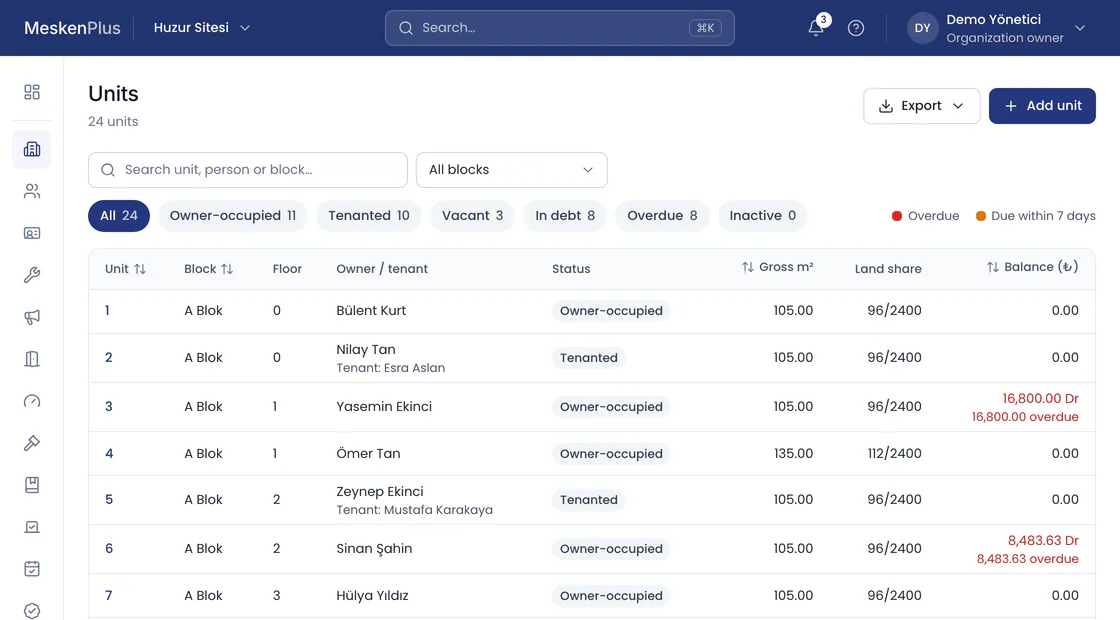
The unit list of Huzur Sitesi in the MeskenPlus panel: views for owner-occupied, tenanted, vacant, in debt and overdue; each unit’s block, floor, owner or tenant, status, gross area, land share and balance. Overdue debt is shown in red.
Demo data · Huzur Sitesi · Units

Who is it for?

MeskenPlus Konut users, by scale of management
BuildingScaleWho uses it
Apartment building8–60 unitsVolunteer or professional manager, auditor
Residential complex60–1,000 unitsComplex manager, accounting, block managers
Housing estateMore than 1,000 unitsBoard of representatives, parcel and block managers

A month in the panel

A property manager’s month in four steps. The screens are from the MeskenPlus panel, with the data of the demo property Huzur Sitesi.

Dues come from the approved operating budget

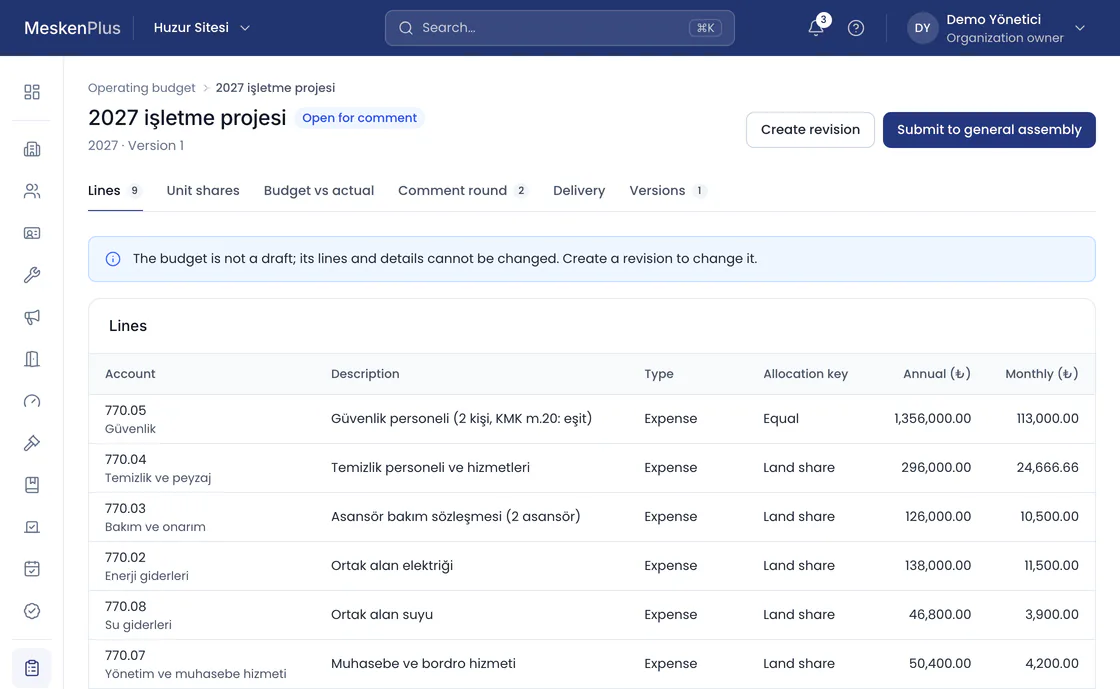
The operating budget approved by the general assembly sets each unit’s monthly share. The month’s charge is previewed unit by unit with the chosen allocation key, then posted.

  • The evidence of approval stays with the budget: the minutes book page, the voting result, the signed minutes.
  • A line above the cap is not saved, and the reason is shown.
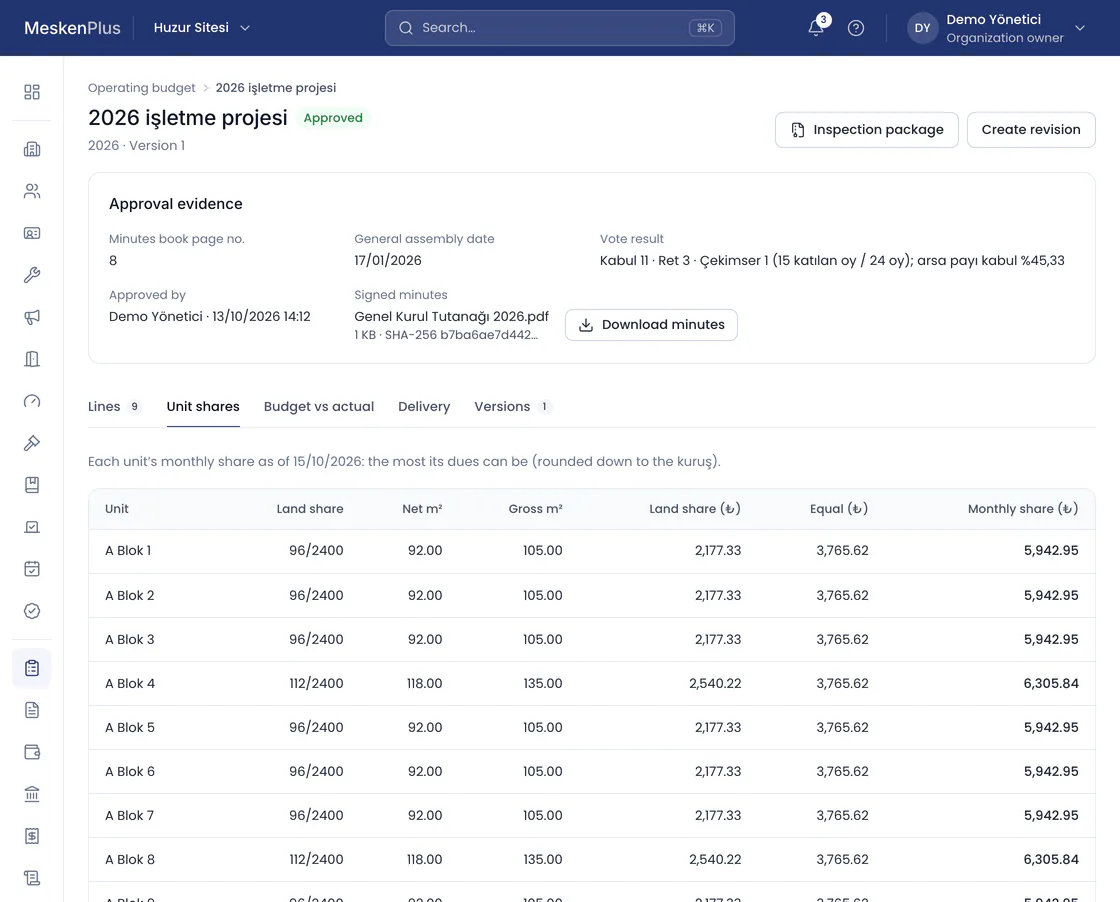
An approved operating budget in the MeskenPlus panel: the evidence of approval — the minutes book page, the date of the general assembly, the voting result and the signed minutes; below it, each unit’s monthly share from the land-share and equal-share lines.
Demo data · Huzur Sitesi · Operating budget · unit shares

Payments come from the bank and match themselves

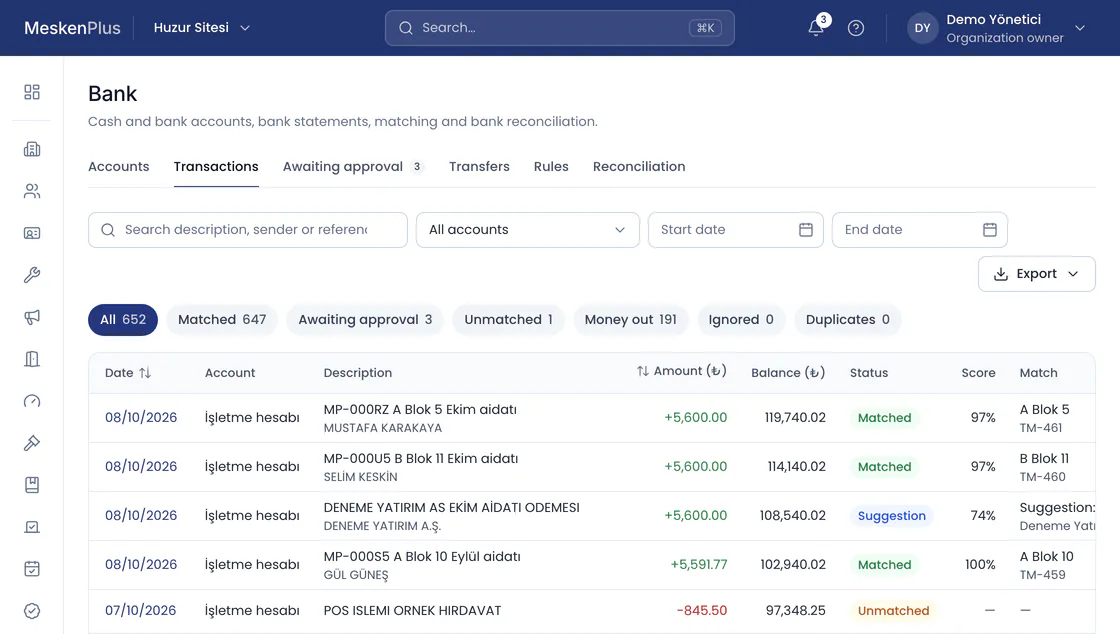
You upload the bank statement as MT940, CAMT.053, Excel or CSV. A transaction matched by its payment reference, unit code, sender IBAN and amount issues the collection receipt and settles the debt.

  • A transaction the system is not sure about goes to the approval queue; a sender IBAN approved by hand is used in later matching.
  • The same transaction is never processed twice.
Bank statement transactions in the MeskenPlus panel: dues payments matched to their unit by the payment reference in the transfer description, with the matching score and the collection receipt issued; an unmatched transaction is flagged separately.
Demo data · Huzur Sitesi · Bank transactions

Expenses go through approval

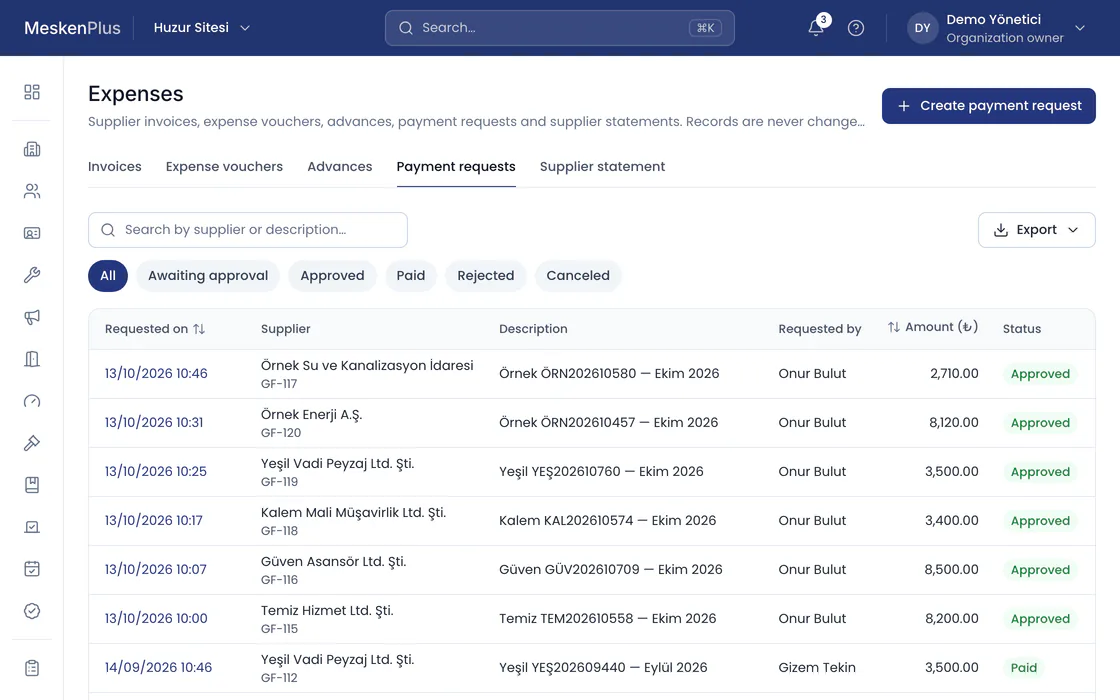
The supplier invoice is recorded and a payment request is raised. A request above the approval threshold is not paid until a second authorized person approves it.

  • The invoice is posted to the expense account and the amount owed to the supplier; the payment settles the invoice.
  • Who decided what, and when: the approval trail cannot be changed or deleted.
Payment requests on the expense screen of the MeskenPlus panel: supplier, invoice, requested by, amount and approval status; views for awaiting approval, approved, paid and rejected.
Demo data · Huzur Sitesi · Payment requests

Month end: reports and transparency

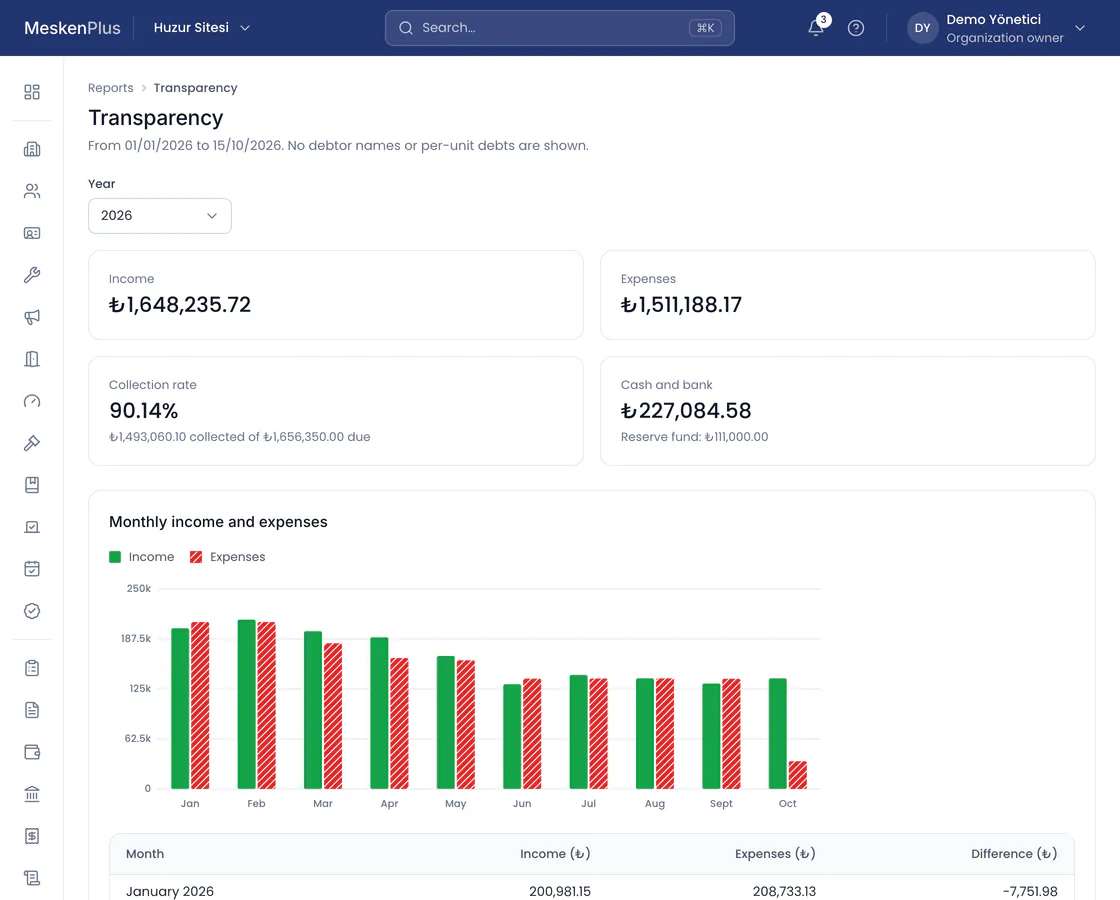
The trial balance, income and expenses, the debtor list and aging come straight from the records and download as Excel, CSV or PDF. Owners see where their dues go on the transparency screen.

  • The transparency screen shows no debtor names and no debt per unit.
  • The auditor checks the same records from their read-only portal.
The transparency report in the MeskenPlus panel: the year’s income, expenses, collection rate and cash and bank balance; a monthly income and expense chart. No debtor names and no debt per unit are shown.
Demo data · Huzur Sitesi · Transparency

Late fees stay within the legal limit

  • The rate is monthly and calculated simply, by the day; a rate above the legal 5% cannot be entered.
  • No late fee is charged on a late fee.
  • The rule in force when the charge is posted is copied to the debt; changing the setting later does not affect old debts.
  • Principal and late fee are separate items; which one a collection settles first is a property setting.

Moving from other software

You move your data yourself with ready-made Excel templates. An import is either written in full or not at all.

  1. Download the templates

    Annotated Excel templates with Turkish headings for units, people, roles, opening balances, cash and bank.

  2. Upload your file

    Excel or CSV; everything in one file, or one file per type of data.

  3. Map and validate

    Map each sheet to a type of data and each column to a field. Every problem row is reported with its row and column in Excel.

  4. Preview and confirm

    See the records to be added, updated and skipped; once you confirm, they are all written in one transaction.

We review the lists you export from other software together during the demo.

Modules

What can be used today is marked; the details of each are on the Features page.

Features labeled “On the roadmap” are in development; the others can be used today.

Accounting

Every module writes money to a single double-entry ledger; there is no other money table.

  • Double-entry ledger and a ready chart of accounts
  • Reversals and fiscal period closing
  • Trial balance, journal, general ledger, unit statements and aging

Charges and collections

A debt is recorded against the unit and the role responsible on that date; even when a tenant moves out, it stays clear whose debt it was.

  • Batch charges and preview
  • Collections, receipts and open item settlement
  • Late fees
  • Bank statements and automatic matching
  • Meters and heating shares
  • Card and QR code paymentsOn the roadmap

Expenses and approval

Money only leaves with the approval of two people; who approved it, and when, is permanent.

  • Expense invoices and suppliers
  • Second approval above the threshold
  • Cash, bank, cheques and promissory notes
  • Staff and payroll

Budget and law

Legal processes are tied to the calendar and to documents.

  • Operating budget compliant with Law No. 7579
  • General assembly, minutes book and compliance calendar
  • Formal notice letters and no-debt certificates

Residents and transparency

Owners see where their dues go; debtors’ names appear on no shared screen.

  • Resident mobile app
  • Transparency screen and auditor portal

Team and permissions

Permissions come from role and scope; a job title is not a permission.

  • Roles and scope
  • Team invitations
See every feature

Questions about Konut

Can a manager who does not know accounting use it?

Yes. The manager works with the charge, collection and expense screens and never sees account codes; the double-entry journal entries are made in the background. The accountant and the auditor see the same records as a ledger.

What does a block manager see?

Only the units, people and service requests of their own block. They do not see the ledger or other blocks; permissions come from role and scope.

How are late fees calculated?

With a monthly rate, by the day and simply; a rate above the legal 5% cannot be entered. The late fee is an item separate from the principal and is finalized at collection.

Where do residents see their debts?

In the resident app: owners and tenants see the debts, receipts and account summary for their own period; household members do not see debts. The app’s release on the App Store and Google Play is being prepared.

How does the auditor get access?

With the auditor role, read-only. The auditor portal runs the automatic checks on the records, and the standard audit report downloads as a PDF. A certified public accountant can be given read-only access for up to 90 days.

Do you have commercial space too?

If there are shops on the ground floor and apartments above, MeskenPlus Ticari manages both sides in the same property, with separate budgets.

Explore Ticari

Open your property’s account today.

Open a trial account in a few minutes, or ask our team for a demo tailored to your property.