Features Every module, from the accounting core to the resident app.
Users work with documents; the accountant and the auditor see the journal entries; collections and late fees are calculated on open items. Below you find what each module does and whether it can be used today.
Features labeled “On the roadmap” are in development; the others can be used today.
At a glance
Pick a module: what it does, its screen and whether it can be used today are below.
- Accounting coreEvery module writes money to a single double-entry ledger. The rules are enforced in the database, not in the application.7 features
- Charges and allocationA debt is recorded against the unit and the role responsible on that date. Who receives the notification is a separate field and does not change legal responsibility.4 features
- Collections and bankMoney always goes into the property’s own bank account. MeskenPlus reads the transactions, matches them and writes them to the ledger.9 features · 1 on the roadmap
- Expenses and approvalMoney only leaves through a recorded approval flow.4 features · 1 on the roadmap
- Operating budget (Law No. 7579)Dues above the legal cap cannot be charged on a budget the general assembly has not approved.4 features
- General assembly and complianceThe owners’ general assembly is run from the panel; a decision written in the minutes book cannot be changed.5 features
- Notice letters and no-debt certificatesA formal notice letter for an overdue debt, a no-debt certificate for a unit without debt. Every letter is kept as a PDF exactly as it was issued.1 feature
- Transparency and auditOwners see where their dues go; the auditor produces the standard report from the records.5 features
- Resident appResidents join a property by invitation only; there is no open property search. The app is built for iOS and Android; its release on the App Store and Google Play is being prepared.4 features · 1 on the roadmap
- Data and migrationYou move your data with ready-made Excel templates; every report and list downloads as a file.3 features
- Users and permissionsPermission = role × scope × validity. The scope can be the organization, a property, a section or a block.5 features
Accounting core
Every module writes money to a single double-entry ledger. The rules are enforced in the database, not in the application.
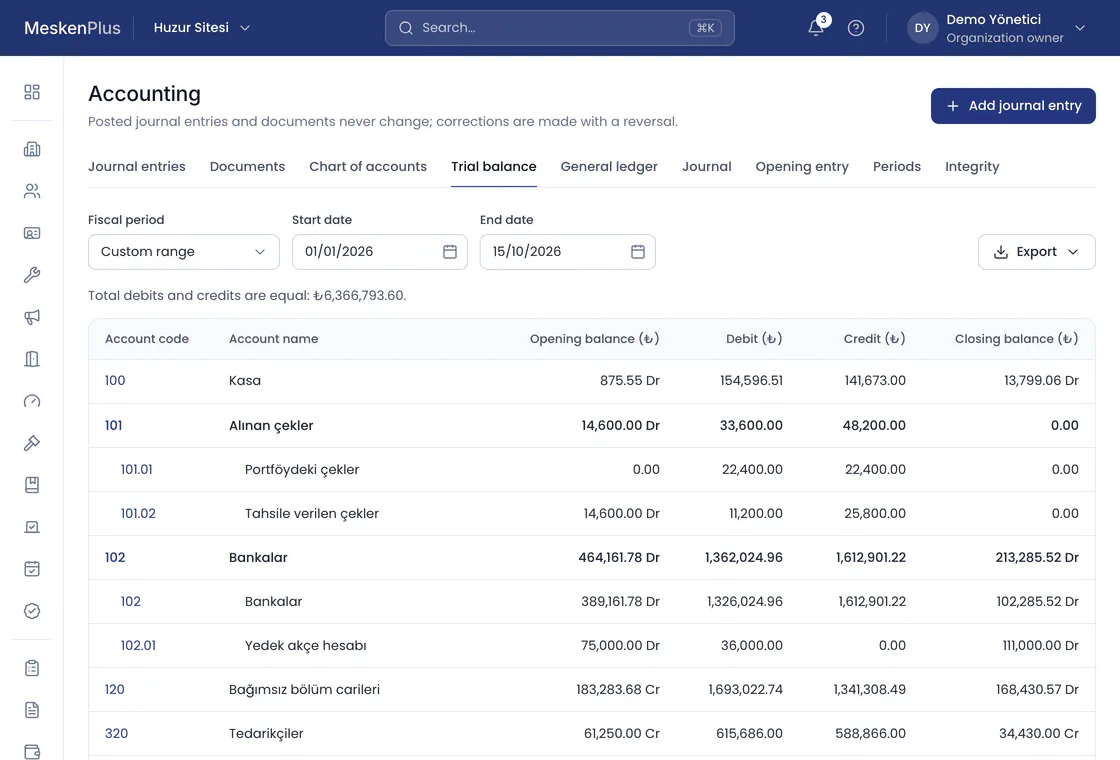
Double-entry ledger
Every journal entry’s debit total equals its credit total; an unbalanced entry never reaches the database.
Posted entries cannot be changed
A posted journal entry cannot be updated or deleted. Corrections are made by reversal, with the reason and who made it.
Hash chain
Every journal entry carries a hash of the one before it; the integrity of the chain is verified with a single check.
Fiscal period closing
No records can be posted to a closed period; the next period opens in sequence.
Document layer
Debit note, collection receipt, reversal document; with series and sequence numbers.
Open items and settlement
Every debt is an open item; a collection settles the oldest due date first, or chosen items can be settled.
Reports
Trial balance, journal, general ledger, unit statement and 0–30 / 31–90 / 91–180 / 180+ day aging; all downloadable as Excel, CSV or PDF.
Charges and allocation
A debt is recorded against the unit and the role responsible on that date. Who receives the notification is a separate field and does not change legal responsibility.
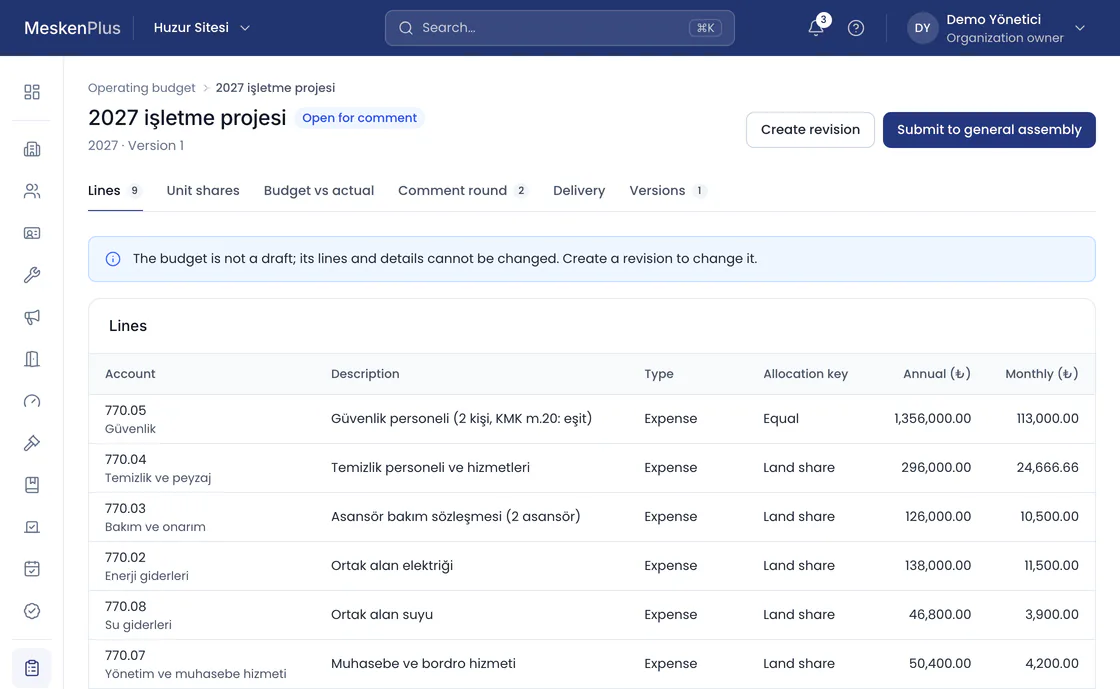
Batch charges
Dues, advances, special levies; for the property, a block, a section or selected units.
Seven allocation keys
Equal share, land share, gross m², net m², leasable m², unit type and unit group.
Unit-by-unit preview
Each unit’s amount and its calculation are visible before posting; a batch charge can be reversed as a whole.
Meter and heat cost allocator distribution
Heating split 30% shared and 70% by consumption; a meter that could not be read is marked as estimated.
Collections and bank
Money always goes into the property’s own bank account. MeskenPlus reads the transactions, matches them and writes them to the ledger.
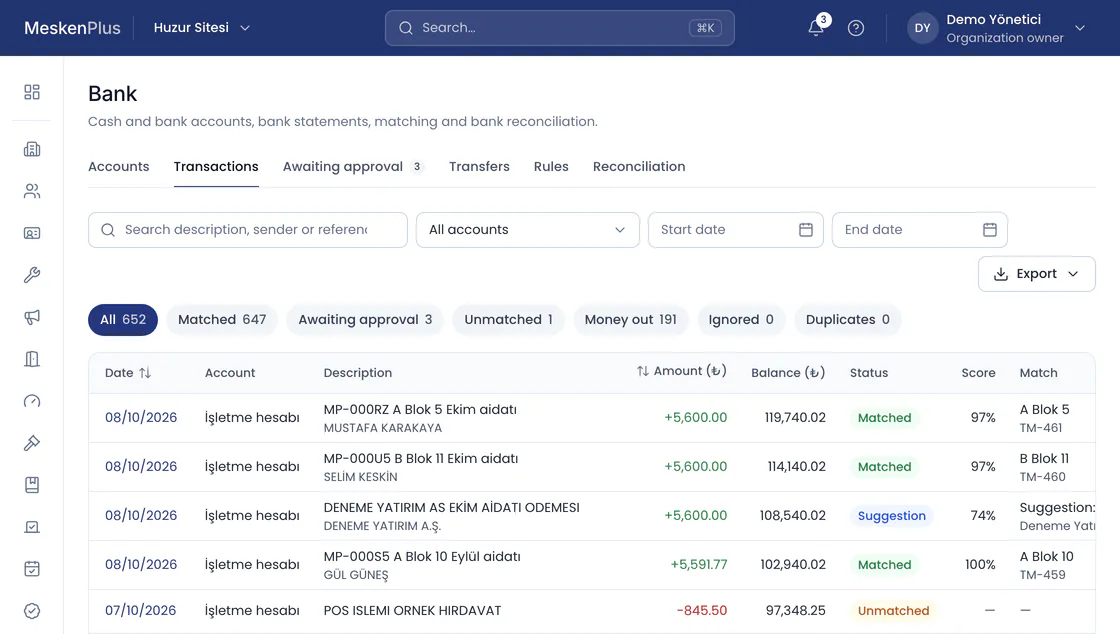
Collections and receipts
Cash or bank collection; the receipt, the journal entry and the settlement are created together.
Advances and automatic settlement
An overpayment stays as a credit balance and settles the next debt automatically.
Late fees
Monthly, day-based and simple; the legal 5% cap is enforced in the database.
Bank connection
Transactions arrive by themselves from the bank’s transaction service and go through the same matching as a statement; our team sets it up on request.
Bank statement upload
MT940, CAMT.053, Excel and CSV (with a column mapping saved per account); the same transaction is never processed twice, and an overlapping file can safely be uploaded again.
Matching engine
Suggests a unit from the reference code, unit code, a sender IBAN approved before, the debt amount and the sender’s name; a transaction it is not sure about goes to the approval queue.
Bank transfer with a reference code
A personal payment reference written in the transfer description matches the transaction to the payer; on a certain match the receipt and the settlement are created automatically.
Cash and bank transactions
Transfers, refunds, bank charges and interest, income receipts; bank rules that suggest entries for recurring transactions, and bank reconciliation.
Cheques and promissory notes
Received and issued cheques and promissory notes; sent for collection, collected, bounced, endorsed, and due date reminders.
Card and QR code payments
On the roadmapThe money goes from the payment institution straight into the property’s account; any card fee is shown before payment, and the property can choose to cover it.
Expenses and approval
Money only leaves through a recorded approval flow.
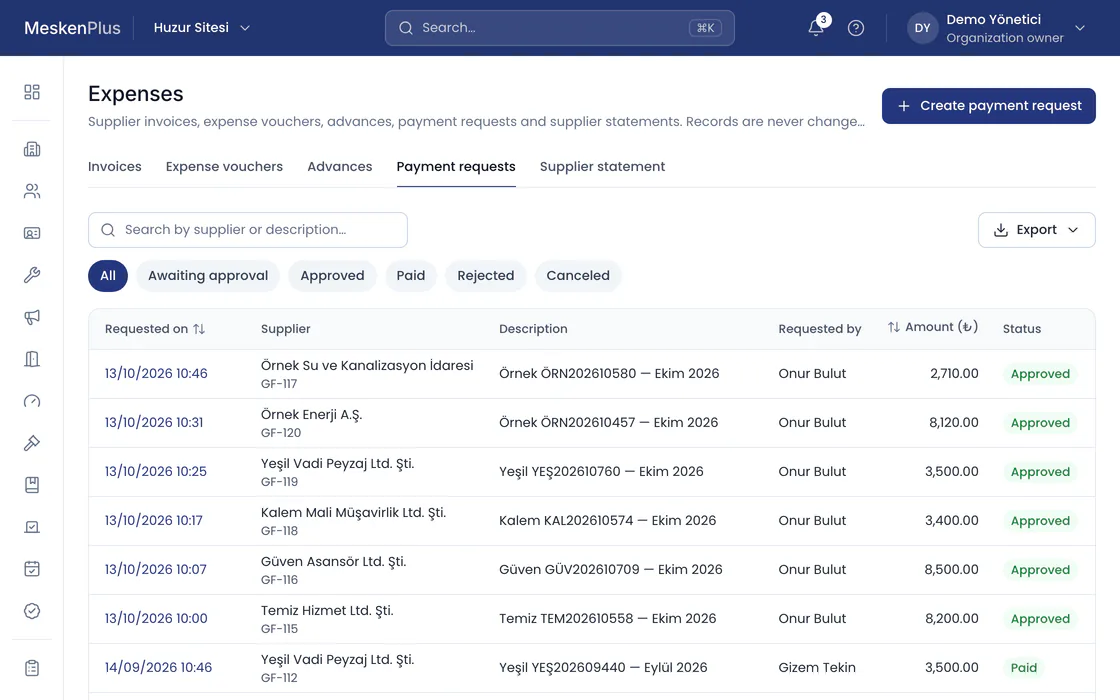
Expense invoices and suppliers
The invoice is posted to the expense account and the amount owed to the supplier; the payment settles the invoice.
Second approval
A payment request above the threshold is not ready for payment until a second authorized person approves it.
Expense receipts and advances
Expense receipts without an invoice; job, staff and order advances, their refund and offset against the invoice; supplier statements.
Staff and payroll
Staff records, annual leave, monthly payroll and payslips; payroll is accrued in the ledger and its payment follows the approval threshold.
Quote comparison
On the roadmapFor purchases above the threshold, at least three quotes are uploaded and shown to the owners.
Operating budget (Law No. 7579)
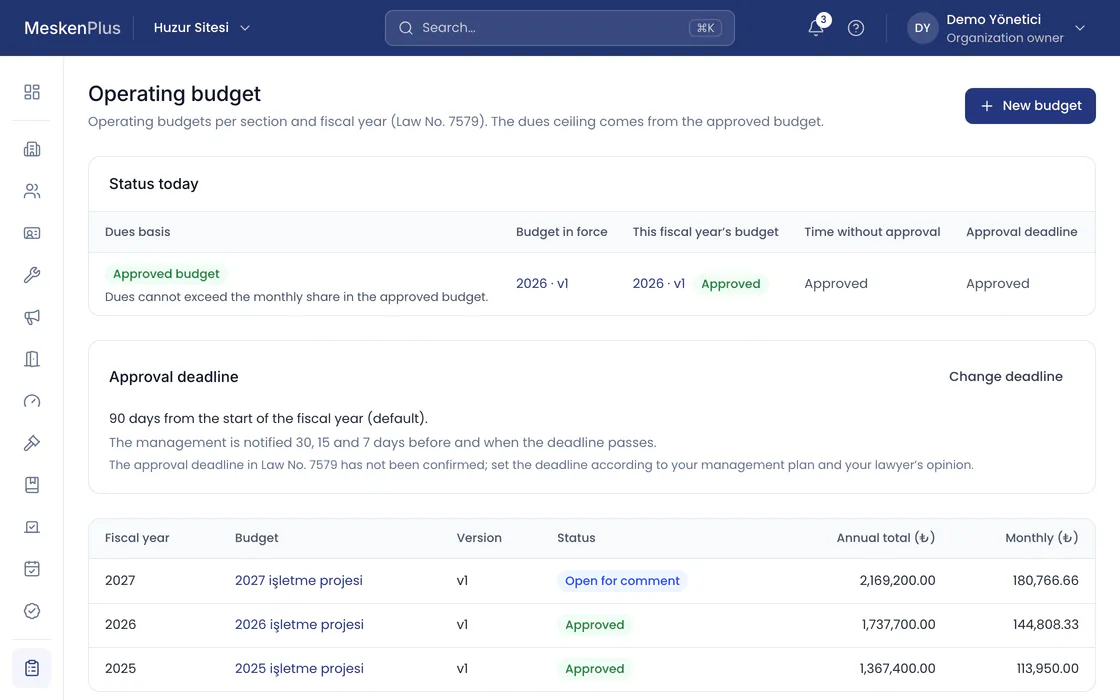
Dues above the legal cap cannot be charged on a budget the general assembly has not approved.
Budget lifecycle
Draft, open for comments, submitted to the general assembly, approved; a change during the year is a new version.
Provisional budget cap
Until approval, every charge is compared with the cap; a line above it is not saved.
Deadline calendar
The panel counts down the days left for approval and warns 30, 15 and 7 days before.
Budget vs actual
Variance to date line by line; variances above 10% are flagged.
General assembly and compliance
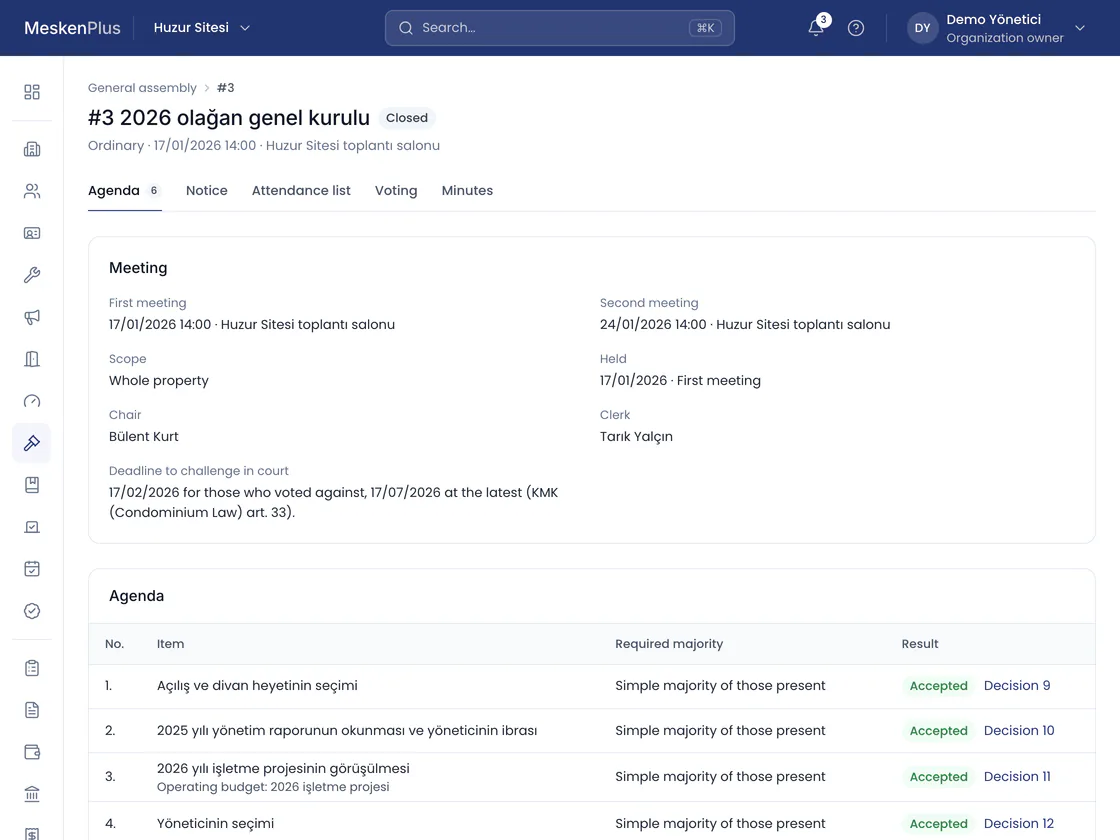
The owners’ general assembly is run from the panel; a decision written in the minutes book cannot be changed.
Meetings and notices
Agenda, records of the notices and checks of the legal deadlines; the date of the second meeting is stated in the notice.
Attendance list, quorum and voting
An attendance list with proxies and joint representatives; quorum and voting results are calculated according to the law, and the minutes come out as a PDF.
Minutes book
A decision cannot be changed once written; the operating budget is approved from the decision.
Polls
One vote per unit, secret ballot if wanted; results by votes and by land share.
Compliance calendar
Legal obligations, completion with evidence and reminders before the deadline.
Notice letters and no-debt certificates
A formal notice letter for an overdue debt, a no-debt certificate for a unit without debt. Every letter is kept as a PDF exactly as it was issued.
Formal notice letters and no-debt certificates
A notice letter with principal and late fee period by period; for a unit without debt, a no-debt certificate verified by QR code.
Transparency and audit
Owners see where their dues go; the auditor produces the standard report from the records.
Read-only auditor
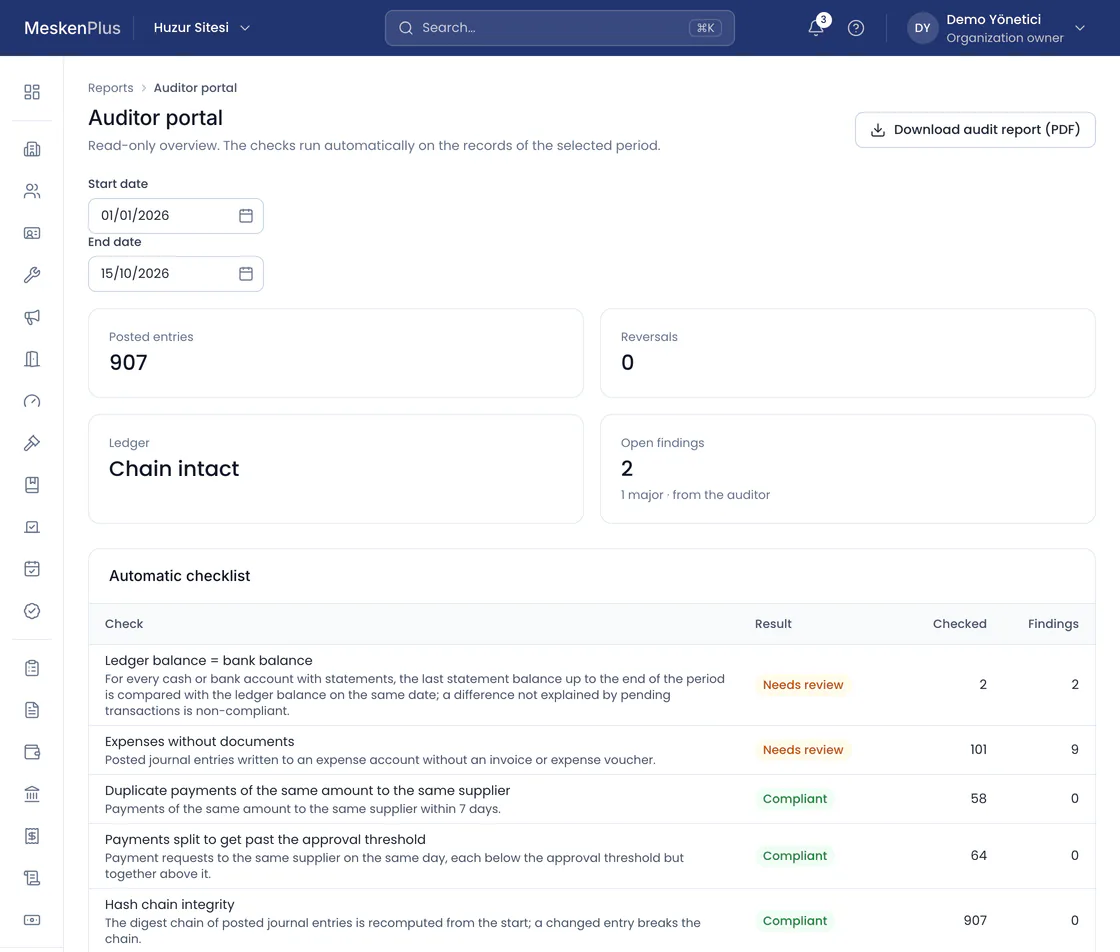
The auditor sees the ledger and the records and cannot change any record.
Audit trail
Every management action is recorded, unchangeably, with who, what, when and the result.
Automatic checklist
Ledger–bank agreement, expenses without documents, duplicate payments, payments split to get around the threshold.
Findings and external auditors
The auditor writes a finding on a record or document and the management answers; a certified public accountant can be given read-only access for up to 90 days.
Owner transparency screen
Income and expense summary, budget vs actual, collection rate and cash and bank balance; debtors’ names are never shown.
Resident app
Residents join a property by invitation only; there is no open property search. The app is built for iOS and Android; its release on the App Store and Google Play is being prepared.
My debts
- October 2026 duesDue 10/10/2026Not yet due1,250.00
- September 2026 duesPaid · 08/09/2026Paid1,250.00
Debts and statements
Debts, payments and receipts; principal and late fee separate.
Announcements and service requests
Announcements, polls, fault and service requests, status tracking.
Joining by invitation
With a personal invitation code, or with the unit code on the door and the management’s approval; nobody can declare themselves an owner.
Transparency and general assembly
Where the dues go, poll votes, the general assembly agenda and published decisions.
Push notifications and SMS
On the roadmapIn-app notifications and email work today; push notifications to the phone and SMS are on the roadmap.
Data and migration
You move your data with ready-made Excel templates; every report and list downloads as a file.
Import from Excel
Units, people, roles, opening balances, cash and bank; the file is validated and previewed first, and everything is written together once confirmed.
Export
Reports and lists as Excel, CSV or PDF; every export is written to the audit trail, and files with personal data are watermarked.
Data health
Lists gaps such as units without an owner, missing land shares or unread meters, and leads to the screen that fixes them.
Users and permissions
Permission = role × scope × validity. The scope can be the organization, a property, a section or a block.
Ready-made roles
Organization owner, property manager, block manager, accountant, auditor.
Team invitations
Invitation by email; the role and scope come with the invitation.
Account security
Account lockout after failed password attempts, and request limits.
Two-step verification
Required for the organization owner, property manager, accountant and auditor; other roles can turn it on.
Management company panel
All of an organization’s properties in one table: collection rate, receivables, cash and bank, open service requests, operating budget and compliance status; Excel, PDF and CSV.
Open your property’s account today.
Open a trial account in a few minutes, or ask our team for a demo tailored to your property.